What this is about
A role says who may run an operation. Sometimes that is not enough. Health data, for example, should only be read by someone who signed in with a second factor, that is, with a code from an app or a security key on top of the password. And it should only be changed by someone who signed in just now, not three hours ago.
For this, a model carries a sign-in requirement per operation. It has two parts:
- the sign-in level: how strongly you must at least have signed in,
- optionally the maximum sign-in age: at most how many seconds ago your sign-in may have happened.
If you do not meet the requirement, CDMS answers with 401 and the key cias.authentication.step-up-required|…. Your token is valid. Only a stronger or more recent sign-in is missing. Catching up on this sign-in is called a step-up.
There are three sign-in levels, each includes the ones below it:
| Level | Key | means |
|---|---|---|
| Signed in | basic | password or another simple sign-in |
| Second factor | mfa | sign-in with a second factor |
| phishing-resistant | phishing-resistant | a sign-in that a fake page cannot capture, for example with a passkey |
How CIAS knows the level of your sign-in is described in Sign-in level and step-up.
How you state it
In the model file (models.yaml) the requirement is a list of its own, authentication, next to the roles. Each entry names one operation:
- name: "Record"
  "@type": "DataModel"
  roles:
    - type: "READ"
  authentication:
    - type: "READ"        # read only with a second factor, no matter how long ago
      level: "MFA"
    - type: "UPDATE"      # change only with a second factor from the last 5 minutes
      level: "MFA"
maxAge: 300| Setting | Required? | Values |
|---|---|---|
type | yes | CREATE, READ, UPDATE, DELETE |
level | yes | basic, mfa, phishing-resistant or the hub spelling BASIC, MFA, PHISHING_RESISTANT |
maxAge | no | whole seconds, at least 1. If it is missing, any age is fine |
An operation without an entry asks for nothing beyond its role. The requirement is independent of the roles: an operation can ask for a sign-in level without having an action role of its own. It does not get finer than per operation; single fields carry no requirement.
Which operation asks for what
You only state the four operations. Every endpoint belongs to one of them:
| Endpoint | asks the requirement of |
|---|---|
POST /create | CREATE, and for the answer also READ |
POST /read/{id}, GET /read/{id} | READ |
| linking or unlinking an existing object of this model while writing (CDMS checks whether you may read it) | READ |
POST /query, counting | READ, for the whole request |
GET /{id}/file (download) | READ |
POST /{id}/history (read history) | READ |
PUT /update/{id}, PATCH /update/{id} | UPDATE, and for the answer also READ |
POST /{id}/rollback/{revision} | UPDATE |
DELETE /delete/{id} | DELETE |
Two points in it matter:
- The answer of a write is a read. Create and update hand back the stored record. So if the model asks for a second factor for
READ, it asks for it there too. If it is missing, CDMS rolls the write back and answers 401. Nothing stays stored, so the client may simply repeat the request after the new sign-in. - A search is refused as a whole. If
READasks for more than your sign-in offers,POST /queryanswers 401. CDMS filters no rows out and returns no empty list. Otherwise it would look as if there were no data.
A relation counts too. If your response names a field that leads into a model with a requirement, that model’s READ requirement applies. This also holds when you reach the model through a field role.
First the permission, then the sign-in
-
CDMSPermissionDo you have the read role or the field role of the relation?↳ no 403
missing-permission|<role>, filtered without strict mode -
CDMSSign-inIs your sign-in at least
mfa, and is it recent enough?↳ no 401cias.authentication.step-up-required|mfa -
CDMSRowDo the filters let the row through?↳ no 404
not-found - 200 with the record
When changing and deleting, as always the row comes first, then the role, then the sign-in. See The three levels at a glance.
Whoever lacks the permission is not asked about the sign-in at all. They get the answer as before. Whoever has it and does not meet the sign-in requirement always gets 401, also without strict mode.
| Permission | Requirement on the operation | Sign-in meets it | Answer |
|---|---|---|---|
| no | – | – | 403, when reading without strict mode silently filtered |
| yes | no | – | as without a requirement |
| yes | yes | yes | as without a requirement |
| yes | yes | no | 401 cias.authentication.step-up-required|…, write rolled back |
When your sign-in meets the requirement:
- Your level is at least the one asked for.
phishing-resistantalso meetsmfa. - If a maximum age is set, your sign-in happened at most that many seconds ago. A token without a sign-in time never meets a maximum age.
- A token without a level, or with an unknown one, counts as
basic.
The 401 answer
PUT /api/rest/health/record/update/5a2b…
{ "data": { "id": "5a2b…", "label": "new" }, "response": ["id", "label"] }WWW-Authenticate: Bearer error="insufficient_user_authentication",
error_description="A stronger or more recent sign-in is required",
acr_values="mfa", max_age=300
{
"messageKey": "cias.authentication.step-up-required|mfa|300",
"code": "401",
"layer": "api"
}The messageKey names the level and, if set, the maximum age in seconds. Without a maximum age it ends after the level: cias.authentication.step-up-required|mfa, and the header has no max_age. The header follows the standard RFC 9470. It tells a client what it has to sign in again with: acr_values is the level, max_age the maximum age.
How the frontend and the sign-in react to it, that is, sign in again and repeat the request once, is described in Catching up on a stronger sign-in (step-up).
Abstract models and subtypes
A subtype of an abstract model inherits the requirements of its parents. Otherwise its own endpoint would be a way around the parents’ rule.
If the subtype states one for the same operation itself, the stricter one holds: the higher level and the shorter maximum age. So a subtype can tighten, but never loosen.
| Parent | Subtype | holds on the subtype |
|---|---|---|
READ mfa | – | READ mfa |
READ mfa | READ basic | READ mfa |
UPDATE mfa, 600 s | UPDATE basic, 300 s | UPDATE mfa, 300 s |
Public operations
An operation with publicAccess: true needs no role. It cannot ask for a sign-in, because nobody is asked about a person there. If a model asks for a sign-in level for an operation and offers the same operation publicly, the generator stops the build. Here download and history count as READ, a rollback as UPDATE. See Model roles.
Who is not asked
When: A server signs in with client credentials.
A service account cannot sign in again. A requirement would lock it out for good. So it gets through. It is protected by its credentials and its roles.
Result: no sign-in check, roles and filters still apply
When: The application runs without sign-in (authentication: NONE).
Without sign-in there is nobody CDMS could ask about their sign-in. The requirements do not apply then.
Result: no sign-in check
Setting it in the hub
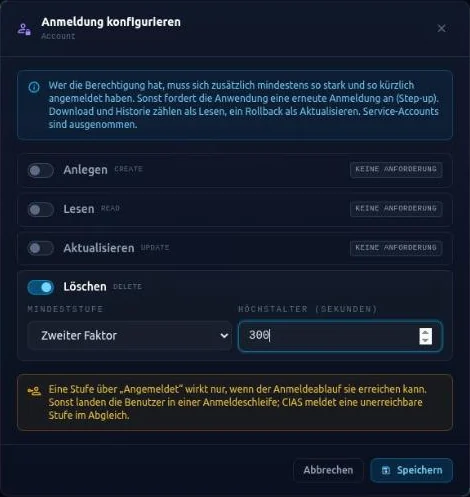
In the hub, the view of a model shows the block Sign-in directly below the Permissions, for example “Sign-in (1 of 4 actions with a requirement)”. It shows the level and the maximum age for each action.
With Edit you open the dialog Configure sign-in. For each action (Create, Read, Update, Delete) you tick “Require a sign-in for …”. Then you pick the Lowest level (Signed in, Second factor, Passkey / phishing-resistant) and, if you want, the Maximum age (seconds). Empty means: any age. At build time this ends up as the list authentication in the model file.
If an AI client changes the model through the MCP server, its blueprint can state authentication as well. On an existing model the hub then only adds operations that have no requirement yet. A stored requirement that differs stays, and the hub reports the difference as a warning. So the MCP server never loosens a protection. You can change it only in the hub itself. See Schema change through the MCP server.
CIAS knows the levels
At build time the generator collects every level that some model asks for. CDMS reports them to CIAS together with roles and attributes, in standalone mode through GET /cias/fetch in the field authenticationLevels. In the reconciliation CIAS checks whether the sign-in can reach these levels at all, and reports a level where it cannot. See Modules register roles and attributes.
Pitfalls
Where to go next
- What sign-in levels are and how CIAS knows them: Sign-in level and step-up
- The whole way from the 401 to the repeated request: Step-up
- Which role an operation requires: Model roles
- How a client reacts to 401: 401, 403 or 404?