What this is about
Through the administration of CIAS you create accounts, grant roles and open tenants. That is the most sensitive data on the platform. Whether someone needs a second factor for it, or must have signed in just now, is something CIAS cannot know for every installation. So the installation sets it: for each area of the administration, separately for reading and changing.
Each setting is a requirement made of a sign-in level and, if wanted, a maximum age. What that is, and what the answer looks like when the sign-in is not enough, is described in Sign-in level and step-up.
Five areas, twice
| Area | What belongs to it |
|---|---|
users | accounts, their attributes, moving one to another tenant, the import |
groups | groups, their members, the import and the reconciliation of groups |
roles | the catalog of declared roles and attributes, grants and revocations, the role reconciliation |
tenants | tenants and their lifecycle: create, suspend, resume, close |
registrations | approving, rejecting, retrying and discarding registrations, registering someone as an administrator, the rules for initial roles |
Each area has two kinds of access:
read: lists, searches and reading a single entry.write: everything that changes something, including starting a reconciliation.
That makes ten requirements.
The settings
codamai.cias.administration.<area>.<access>.level     basic | mfa | phishing-resistant
codamai.cias.administration.<area>.<access>.max-age   whole seconds or ISO-8601
CIAS_ADMINISTRATION_<AREA>_<ACCESS>_LEVEL             the same as an environment variable
CIAS_ADMINISTRATION_<AREA>_<ACCESS>_MAX_AGE
CIAS looks at the setting first and at the environment variable second. ISO-8601 is a format for durations, such as PT5M for five minutes. Even then the result must be whole seconds, at least one.
An example: only someone who signed in with a second factor in the last five minutes may grant roles. Any signed-in person with the permission may read.
codamai:
  cias:
    administration:
      roles:
        write:
          level: mfa
          max-age: 300
The same as environment variables:
CIAS_ADMINISTRATION_ROLES_WRITE_LEVEL=mfa
CIAS_ADMINISTRATION_ROLES_WRITE_MAX_AGE=300
The default is neutral: if a value is missing, basic without a maximum age applies. Every signed-in person satisfies that. Without settings, nothing changes. An installation tightens it; CIAS itself asks for nothing.
A value CIAS cannot read
If a setting holds something CIAS does not understand, the application does not start. The message names the setting. It is a mistake of the installation, and running with a different requirement than the one written down would be the silent kind of mistake. See Reject when in doubt.
| Value | Result |
|---|---|
level: mfa, max-age: 300 or PT5M | applies |
level: high (no known level) | start refused |
max-age: 0 | start refused, at least one second |
max-age: PT0.5S | start refused, whole seconds only |
max-age: five minutes | start refused, neither a number nor ISO-8601 |
What happens with an administration request
| Permission present? | Service account? | Sign-in satisfies the requirement? | Answer |
|---|---|---|---|
| no | – | – | the administration's 403, as always |
| yes | yes | – | the request runs. Service accounts are exempt |
| yes | no | no | 401 cias.authentication.step-up-required|<level>[|<seconds>] with a header per RFC 9470 |
| yes | no | yes | the request runs |
Permission first. Whoever may not do something at all gets the usual 403. Sending them to a stronger sign-in first, which would still not let them in afterwards, would be pointless.
Service accounts are exempt. A service account cannot sign in again and has no sign-in time. Any requirement above basic or with a maximum age would lock it out for good. Its secret and its roles protect it. CIAS recognizes it by azp and preferred_username in the form service-account-<client>, see Service accounts.
CIAS declares its levels
CIAS is a module itself and declares, in its declaration, the levels its settings name. If roles.write requires the level mfa, for example, mfa is in the list.
That way the reconciliation checks whether the sign-in sequence in Keycloak reaches this level. If the step for it is missing, the report says so, with cias as the module. Without that step nobody would get into this part of the administration anymore.
What is not covered
The requirements only apply when a person operates the administration. Not covered are:
- self-service: what a person reads or changes about themselves, see Self-service
- the lookup endpoints between services, such as for the tenant gate or the attribute values per tenant
- the startup passes, such as the first role reconciliation
- the in-process hooks of a registration, and a registration flow that your own code starts without a signed-in caller
There, no administrator is acting, or there is no person who could be asked.
Set when assembling in the hub
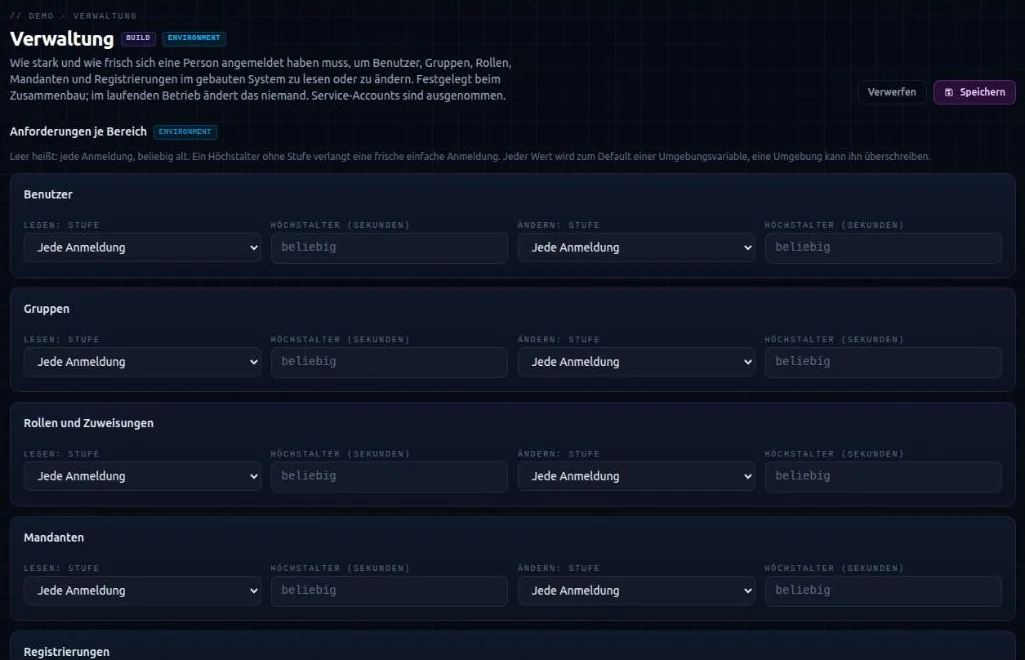
In the hub you set the ten requirements on the CIAS module of a project, in the CIAS portal in the area Administration.
-
1Developer→Hubpicks, in the area Administration, a level and, where needed, a maximum age in seconds per area for reading and changingEmpty means any sign-in, of any age. A maximum age without a level asks for a recent basic sign-in.
-
2Hubchecks the inputA maximum age below one second or not a whole number is an error. A hint appears when the matching part of CIAS is switched off, or when a level above
basicis required: then the sign-in sequence in Keycloak must reach this level. -
3Generatorwrites every value that is set as the default of its environment variable into the system's
cias-configuration.yamlResult: for examplelevel: ${CIAS_ADMINISTRATION_ROLES_WRITE_LEVEL:mfa}andmax-age: ${CIAS_ADMINISTRATION_ROLES_WRITE_MAX_AGE:300}
The values take effect with the next build. An environment can override each one through its environment variable. What stays empty, the generator does not write at all, and the neutral default applies.
After that, the built system has no connection to the hub. It reads the values from its configuration at startup.
No change at runtime
There is no endpoint and no other way to change a requirement in the running system. That is on purpose: whoever could lower a requirement could switch the step-up off, exactly for the data it is meant to protect. A change only goes through the hub with a new build, or through the environment variable with a new start.