What this is about
Whoever reads or changes a final document first needs the matching document role, see Roles. Some documents need more: every person with the reader role may see an audit report, but a health report only someone who signed in with a second factor.
This is what the sign-in level is for. It says how strongly a person signed in:
| Level | Meaning |
|---|---|
basic | simply signed in, for example with a password |
mfa | with a second factor, for example a code from an app |
phishing-resistant | with a method that cannot be phished, for example a passkey |
On top of that comes the maximum sign-in age: how long ago the sign-in may have happened at most. What the levels mean exactly and how CIAS reads them from the token is described in The sign-in level.
Read and change
Every requirement exists twice:
| Requirement | applies to |
|---|---|
read (read) | reading a document, listing the revisions of a chain, verifying a document |
change (write) | placing a legal hold, releasing a legal hold, erasing a document |
The endpoints for this are described in Verify and read and Retention, legal hold and erasure.
Which requirement holds
There is a standard for all documents and in addition entries per template key. Where both ask for something, CRMS takes the stricter one: the higher level and the shorter maximum age. The standard is therefore a floor that no key lowers.
| Standard | Entry of the template key | What holds |
|---|---|---|
| nothing | nothing | no requirement, the role is enough |
mfa | nothing | mfa |
| nothing | phishing-resistant, 120 s | phishing-resistant, at most 120 seconds old |
mfa | basic | mfa: the key does not lower the standard |
mfa, 600 s | phishing-resistant, 120 s | phishing-resistant, at most 120 seconds old |
| only 300 s | nothing | any level, the sign-in at most 300 seconds old |
A maximum age alone means: sign in again, at any level. This is how you ask, for example, for a fresh sign-in before erasing.
The flow
-
1Client→CRMSrequests a document, for example
GET /crms/documents/{revision} -
2CRMSDoes the person have the document role? Otherwise 403
document-access-denied -
3CRMSlooks up the chain of the document in the person's tenant. Not there or not visible → 404
document-not-found -
4CRMSderives the requirement from the template key of the chain and compares it with the level and time of the sign-in
-
5CRMS→Clientif the sign-in is not enough: 401
cias.authentication.step-up-required|<level>[|<seconds>] -
6CRMS→Clientreads, verifies or changes the documentResult: The person has the document or the change is done
When listing, the template key is already in the request (template=…). There, CRMS checks the sign-in before it looks up the chain.
The 401 answer carries the level and maximum age asked for, in the body as parameters of the key and in the header WWW-Authenticate. The shape is described in The error answer. The client signs the person in more strongly or again and repeats the request. The step-up shows the whole way.
Service accounts
A service account is a technical account with which an application signs in itself, not a person. It cannot sign in again. That is why it passes the sign-in level. Its protection is its credentials and its roles: it still needs the document role.
Approvals are different: there, the requirement also applies to a service account, see Approval chains.
Where the requirements are defined
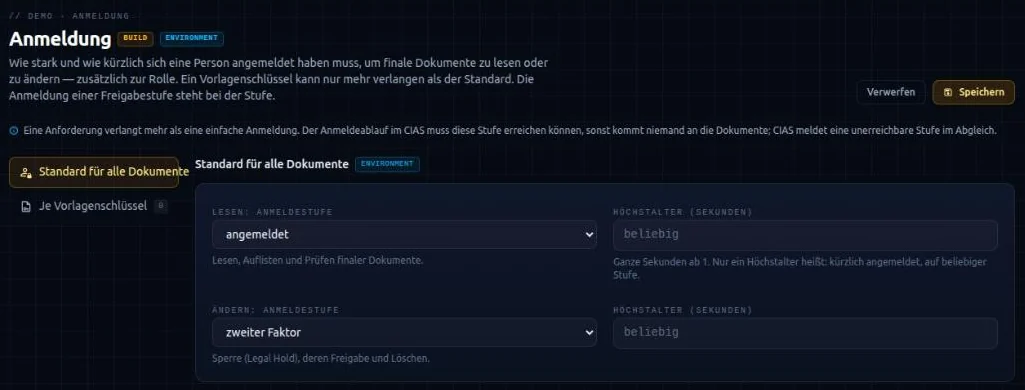
The requirements belong to the project. You define them in the hub on the CRMS module, in the area “Sign-in”. The build writes them into the system’s configuration:
codamai:
  crms:
    document:
      authentication:
        read:  { level: mfa }          # read, list, verify
        write: { max-age: 300 }        # legal hold, release, erasure
        templates:
          - key: health-report
            read: { level: phishing-resistant, max-age: 120 }
max-age is a number of whole seconds or an ISO-8601 duration such as PT5M. An environment can override the standard with CODAMAI_CRMS_DOCUMENT_AUTHENTICATION_READ_LEVEL, …_READ_MAX_AGE, …_WRITE_LEVEL and …_WRITE_MAX_AGE, see Environment variables. The fields in the hub are described in The CRMS module in the hub.
Nothing changes the requirements at runtime: there is no endpoint for it. Whoever could lower a requirement could switch the step-up off.
CRMS reports the levels its documents ask for to CIAS, as long as it stores final documents. CIAS reports in the reconciliation every level the sign-in flow does not reach.